
English
English
Appearance
The Custom Script node (Script Node) is a fine-grained action node in the SmartTable workflow engine. It allows users to write and run custom Python code during workflow execution. The script runs in a restricted sandbox environment, can access output data from upstream nodes and the workflow context, produces a standardized result that is passed downstream, and supports branch routing based on the script's return value.
Compared with fixed-function nodes (such as Find Records, Send Email, and Update Record), the Script node offers the greatest flexibility and can express complex data transformation, cleaning, aggregation, and dynamic conditional logic.
| Scenario Category | Typical Use Cases |
|---|---|
| Data transformation | Field renaming, structural adjustment, unit conversion, format standardization |
| Data cleaning | Null handling, deduplication, regex validation and correction |
| Aggregation and statistics | Sum, average, grouped statistics, percentile calculation |
| Conditional branches | Routing decisions based on complex business rules (multi-condition combinations, threshold judgment) |
| Field extraction | Extract specific fields from nested JSON, flatten structures |
| Data enrichment | String splicing, UUID generation, hash calculation, date formatting |
Target audience:
Prerequisites:
| Knowledge Area | Required Level | Description |
|---|---|---|
| Python | Basic | Understand variables, conditions, loops, functions, and dictionary operations |
| JSON data format | Familiar | Understand JSON objects, arrays, and nested structures |
| SmartTable workflow basics | Basic | Familiar with triggers, nodes, execution instances, and other basic concepts |
| Workflow canvas operations | Familiar | Able to add nodes, connect nodes, and configure node parameters |
| Runtime Environment | Requirement | Description |
|---|---|---|
| Python scripts | Python 3.8+ | Bundled with the backend service; no additional installation required |
Cpu icon and the default name "Custom Script".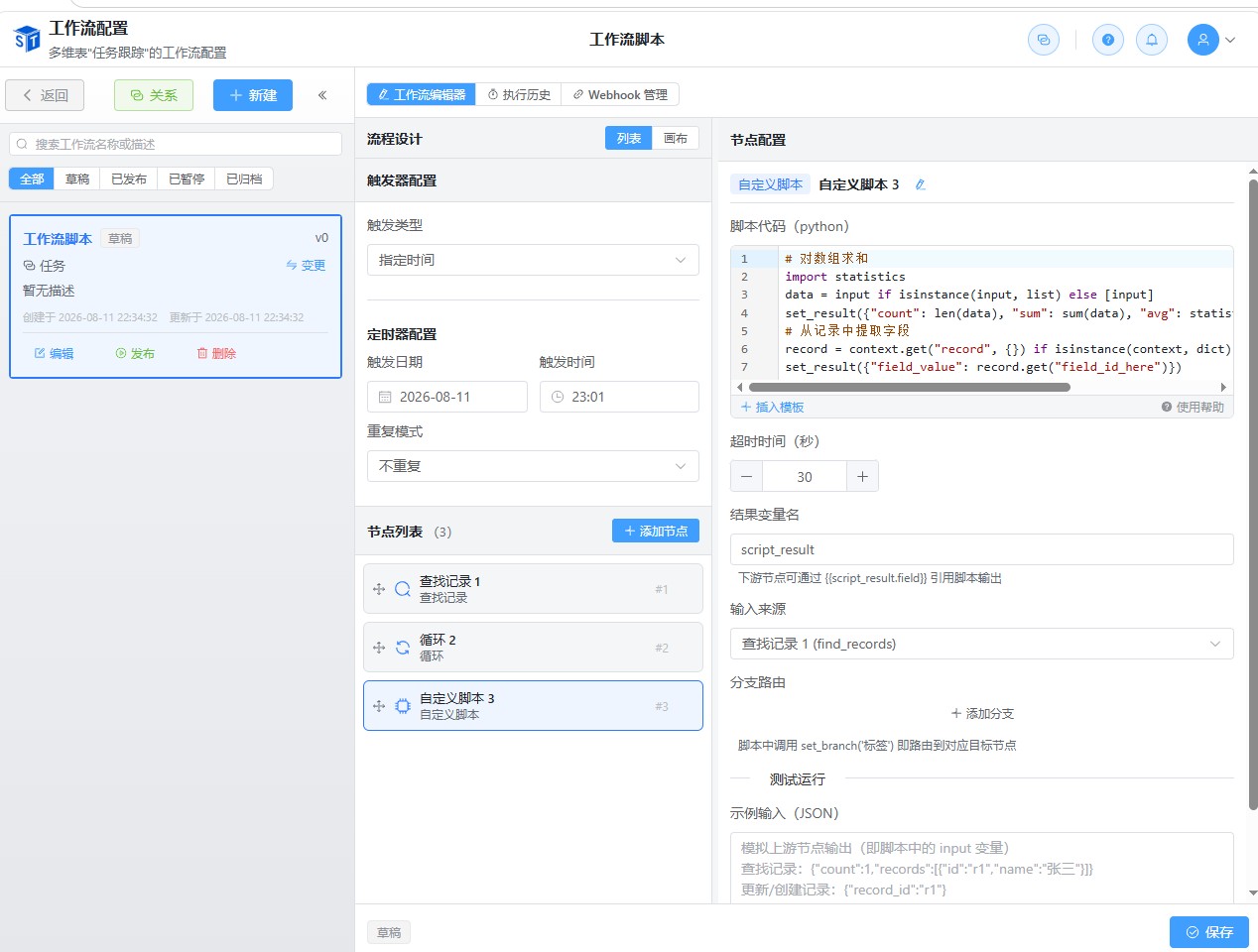
The script source code is not stored as a separate file. Instead, it is saved directly in the config JSON field of the workflow_nodes table, persisted together with other node configurations. The storage structure is as follows:
workflow_nodes
├── id: node UUID
├── node_type: 'script'
├── name: 'Custom script node name'
└── config: {
    "language": "python",                 # Script language
    "script_source": "set_result(42)",    # Script source code
    "timeout": 30,                        # Timeout in seconds
    "result_variable": "script_result",   # Result variable name
    "input_node_id": null,                # Input source node ID
    "branches": []                        # Branch routing configuration
}total_amount or cleanedRecords. Avoid the default script_result.The script runs in a restricted global namespace and can access the following injected variables and functions:
# === Injected variables ===
input       # Output from the upstream node (any JSON value: dict / list / scalar)
context     # Workflow context dictionary
            #   context['trigger']      trigger event data
            #   context['record']       trigger record data
            #   context['instance']     workflow instance information
            #   context['workflow']     workflow configuration
            #   context['loop']         loop context (only available inside a loop body)
            #   context['node_outputs'] dictionary of outputs from all preceding nodes

# === Injected functions ===
set_result(value)   # Set the script output result (recommended)
set_branch(label)   # Declare a branch label for branch routing
result              # Alternative: assigning directly to the result variable is also treated as output
Minimal example:
# Return a fixed value directly
set_result({"message": "Hello, SmartTable!", "code": 200})
Reading input example:
# Assume the upstream find_records node outputs {records: [...], count: N}
data = input or {}
records = data.get('records', []) if isinstance(data, dict) else []
set_result({
    "total": len(records),
    "first_id": records[0].get('id') if records else None
})Python whitelist modules (11 in total):
| Module | Purpose | Common APIs |
|---|---|---|
json | JSON encoding/decoding | json.loads, json.dumps |
re | Regular expressions | re.match, re.sub, re.findall |
math | Mathematical operations | math.ceil, math.floor, math.sqrt |
datetime | Date and time | datetime.now, datetime.strptime |
decimal | Precise decimals | decimal.Decimal |
collections | Container extensions | collections.Counter, collections.defaultdict |
itertools | Iteration tools | itertools.chain, itertools.groupby |
hashlib | Hash algorithms | hashlib.md5, hashlib.sha256 |
base64 | Base64 encoding | base64.b64encode, base64.b64decode |
uuid | UUID generation | uuid.uuid4, uuid.uuid1 |
statistics | Statistical functions | statistics.mean, statistics.median |
Python sandbox restrictions:
| Category | Disabled Items | Reason |
|---|---|---|
| File I/O | open(), input() | Prevent reading/writing the file system |
| Code execution | exec(), eval(), compile() | Prevent dynamic execution of arbitrary code |
| Module import | __import__('os') and other dangerous modules | Prevent access to system resources |
| Introspection | globals(), locals(), vars() | Prevent sandbox escape |
| Exit | exit(), quit() | Prevent terminating the main process |
The Script node supports two execution modes:
Production execution (when the workflow instance runs):
ScriptExecutionService.execute()subprocess)instance.context[<result_variable>] and instance.context['node_outputs'][<node_id>]WorkflowExecutionLog)Test execution (configuration-stage validation):
POST /api/v1/workflows/<workflow_id>/nodes/script/test endpoint┌─────────────────────────────────────────────────────────┐
│ Flask main process (Python) │
│ ┌──────────────────────────────────────────────────┐ │
│ │ WorkflowExecutionEngine._execute_script_node │ │
│ │ ↓ │ │
│ │ ScriptExecutionService.execute() │ │
│ │ ↓ subprocess.run (timeout control) │ │
│ └──────────────────────────────────────────────────┘ │
│ ↓ │
│ ┌──────────────────────────────────────────────────┐ │
│ │ Python: python_runner.py │ │
│ │ - Read {script_source, input, ctx} from stdin │ │
│ │ - Restricted builtins + safe_import │ │
│ │ - exec() executes user code │ │
│ │ - Output JSON to stdout │ │
│ └──────────────────────────────────────────────────┘ │
└─────────────────────────────────────────────────────────┘| Configuration Item | Requirement | Verification Method |
|---|---|---|
| Python | ≥ 3.8, usually bundled with the backend service | python --version |
Configure script → Click "Test Run" → View result/error feedback → Modify script → Test again → Save after confirmationDebugging steps:
set_result to output intermediate variables to locate the issue.| Issue | Possible Cause | Solution |
|---|---|---|
NameError: name 'open' is not defined | Called a disabled built-in function | Use a whitelist module or adjust logic |
ImportError: module 'os' is forbidden | Imported a non-whitelist module | Use only the 11 whitelist modules |
Script execution timed out (30 seconds) | Infinite loop or long-running processing | Optimize algorithm, increase timeout, or reduce data volume |
Script output exceeds 1MB limit | Returned an overly large data structure | Return only necessary fields; avoid returning raw big data |
Script output is not JSON serializable | Returned functions, class instances, or other non-JSON types | Return only basic types such as dict/list/scalar |
| Test passes but production execution fails | Input data structure differs from the sample | Check the actual output structure of the upstream node |
The complete configuration of the Script node is stored in the WorkflowNode.config JSON field with the following structure:
{
  "language": "python",
  "script_source": "set_result(input)",
  "timeout": 30,
  "result_variable": "script_result",
  "input_node_id": null,
  "branches": [
    {
      "label": "high_priority",
      "target_node_id": "node-uuid-xxx"
    }
  ]
}| Field | Type | Required | Default | Range | Description |
|---|---|---|---|---|---|
language | string | Yes | - | "python" | Script language |
script_source | string | Yes | - | Non-empty, ≤ 50000 characters | Script source code |
timeout | number | No | 30 | Positive integer 1 ~ 300 | Execution timeout in seconds |
result_variable | string | No | "script_result" | ^[a-zA-Z_][a-zA-Z0-9_]{0,63}$ | Result variable name |
input_node_id | string | null | No | null | Existing node UUID | Input source node ID |
branches | array | No | [] | See table below | Branch routing configuration |
Branches sub-item structure:
| Field | Type | Required | Description |
|---|---|---|---|
label | string | Yes | Branch label (referenced in the script via set_branch('label'); unique within the same node) |
target_node_id | string | Yes | Target node ID (must exist in the same workflow) |
Frontend TypeScript types (src/types/workflow.ts):
export type ScriptLanguage = 'python';

export interface ScriptBranch {
  /** Branch label (referenced in the script via set_branch(label)) */
  label: string;
  /** Target node ID */
  target_node_id: string;
}

export interface ScriptNodeConfig {
  /** Script language: python */
  language: ScriptLanguage;
  /** Script source code (≤ 50000 characters) */
  script_source: string;
  /** Execution timeout in seconds (1-300, default 30) */
  timeout: number;
  /** Result variable name (default script_result; downstream can reference via {{<result_variable>.field}}) */
  result_variable: string;
  /** Input source node ID (defaults to output of the most recent predecessor when omitted) */
  input_node_id?: string | null;
  /** Branch routing configuration */
  branches: ScriptBranch[];
}The backend WorkflowService._validate_script_node performs validation when a workflow is created or updated, returning a 400 error on failure:
| Validation Item | Rule | Example Error Message |
|---|---|---|
language | Must be 'python' | "Script language must be 'python'" |
script_source | Non-empty string | "Script content cannot be empty" |
script_source length | ≤ 50000 characters | "Script content cannot exceed 50000 characters" |
timeout | Positive integer between 1 and 300 (boolean excluded) | "Timeout must be a positive integer between 1 and 300" |
result_variable | Matches ^[a-zA-Z_][a-zA-Z0-9_]{0,63}$ | "Result variable name must start with a letter or underscore and contain only letters, digits, and underscores (≤ 64 characters)" |
branches.label | Non-empty, unique | "Duplicate branch label: high_priority" |
branches.target_node_id | Non-empty, exists in the workflow node set | "Target node of branch high_priority does not exist: xxx" |
The Script node configuration does not involve inheritance; all configuration items are independent at the node level. However, the input source follows the priority rules below:
Explicit input_node_id > Output of the most recent predecessor > Merged dictionary of multiple predecessors > None| Scenario | Behavior |
|---|---|
input_node_id specified | input = the node's output_result |
input_node_id empty, single predecessor | input = the predecessor node's output_result |
input_node_id empty, multiple predecessors | input = dictionary { "<node_id_1>": <output_1>, "<node_id_2>": <output_2>, ... } |
| No predecessor | input = null |
| Configuration Type | Description | Example |
|---|---|---|
| Static configuration | Determined when the node is saved; immutable at runtime | language, script_source, timeout, result_variable, branches |
| Dynamic data | Injected from the workflow context at runtime | input (upstream output), context.trigger, context.record, context.loop |
Key differences:
input and context; static configuration cannot be modified.input comes from user-provided sample JSON and context is a minimal context.The Script node is an ordinary action node (non-container) on the workflow canvas, at the same level as nodes such as find_records, send_email, and update_record. The node card displays:
Cpu iconCustom ScriptThe configuration panel contains the following areas (from top to bottom):
Supports editing in any state. Click the edit icon to enter edit mode, press Enter to save, and press Esc to cancel.
The Script node uses Python as the fixed script language; no selection is required in the configuration panel.
A CodeMirror 6-based code editor provides:
The editor toolbar contains an "Insert Template" dropdown button. Clicking it displays a list of common templates for the current language; selecting a template appends the code to the end of the current script.
A numeric input box with a range of 1-300 and a default of 30. Scripts that do not complete within the set time will be forcibly terminated.
A text input box with the default script_result. Downstream nodes can reference the script output via {{<result_variable>.field}}.
The hint text dynamically displays how to reference the current variable name, for example: Downstream nodes can reference script output via {{total_amount.field}}.
A dropdown selector with the following options:
Multiple branch rules can be added. Each rule contains:
set_branch('label')Click the "Add Branch" button to add a rule, and click the delete icon to remove one.
Contains:
┌─────────────────────────────────────────────────────────────┐
│  Workflow instance context (instance.context)               │
│  ┌─────────────────────────────────────────────────────┐    │
│  │  node_outputs: {                                    │    │
│  │    "node-A-id": { result: ..., branch: ..., ... },  │    │
│  │    "node-B-id": { result: ..., branch: ..., ... },  │    │
│  │    "script-node-id": { result: <script output>, branch: ... }│   │
│  │  }                                                  │    │
│  │  script_result: <script output>  # result variable directly written │    │
│  │  loop_context: { ... }           # loop context     │    │
│  │  record: { ... }                 # trigger record   │    │
│  │  trigger_event: { ... }          # trigger event    │    │
│  └─────────────────────────────────────────────────────┘    │
└─────────────────────────────────────────────────────────────┘When the script is executed, the engine resolves the input data through _resolve_script_input and injects it into the script's global scope as the input variable.
After the script sets the output via set_result(value), the engine performs the following writes:
instance.context[<result_variable>] = valueinstance.context['node_outputs'][<node_id>] = { result: value, branch: <label>, duration_ms: <int> }execution_log.output_result = { result, branch, duration_ms, next_nodes }Downstream nodes can reference script output in two ways:
Method 1: Reference via result variable name (recommended)
{{script_result.field_name}}Applicable when the Script node's result_variable is the default script_result or a custom name. The engine exposes non-reserved keys in instance.context to the top level of the rendering context.
Method 2: Reference via node_outputs
{{node_outputs.<script_node_id>.result.field_name}}Applicable when you need to reference the output of any preceding node (not only the direct predecessor). <script_node_id> is the UUID of the Script node.
The Script node can be used as a child node of a loop body. In this case, context.loop contains loop iteration data:
current = context['loop']['current_data']  # current iteration data
index = context['loop']['index']           # current index (0-based)
round_num = context['loop']['round']       # current round (1-based)
total = context['loop']['total'] # total iterationsScript execution fails
↓
_execute_script_node returns {status: 'error', error_message: ...}
↓
execute_node detects status='error'
↓
├── execution_log.status = 'error'
├── execution_log.error_message = error message (including traceback)
├── error_message written to node_outputs for downstream reference
↓
Check node.config.continue_on_error
├── true → return error result, workflow continues to the next node
└── false → raise RuntimeError, terminating the workflow instanceNodes support the max_retries configuration (set in node.config, not exclusive to Script nodes):
max_retries = 0; failure terminates immediatelymax_retries = N is set, automatic retries occur up to N times after failure| Script Behavior | Routing Result |
|---|---|
set_branch('label') and label exists in branches config | Route to the corresponding target_node_id (unique next_nodes) |
set_branch('unknown') but label is not in config | Fall back to default next_nodes; a warning is logged |
set_branch not called | Use default next_nodes (standard sequential flow) |
Default next_nodes is empty | Workflow execution chain ends normally |
Scenario: After obtaining order records from a Find Records node, you need to clean null values, calculate order levels, and route to different processing nodes by amount.
Workflow orchestration:
Trigger → Find order records → Custom Script (clean + grade) → Branch routing
                                                    ├── High priority → Urgent processing node
                                                    ├── Normal order → Regular processing node
                                                    └── Default      → Archive node
Script configuration:
cleaned_orderhigh → urgent processing nodenormal → regular processing nodeScript code:
import re
from datetime import datetime

# Read upstream find_records output
data = input or {}
records = data.get('records', []) if isinstance(data, dict) else []

cleaned = []
total_amount = 0

for record in records:
    # Clean amount: remove currency symbols and commas
    raw_amount = record.get('amount', '0')
    if isinstance(raw_amount, str):
        amount_str = re.sub(r'[¥$,]', '', raw_amount)
        try:
            amount = float(amount_str)
        except ValueError:
            amount = 0.0
    else:
        amount = float(raw_amount or 0)

    # Clean customer name: remove leading and trailing spaces
    customer_name = (record.get('customer_name') or '').strip()

    # Clean order date: standardize to ISO format
    raw_date = record.get('order_date', '')
    try:
        parsed_date = datetime.strptime(raw_date, '%Y/%m/%d')
        iso_date = parsed_date.strftime('%Y-%m-%d')
    except (ValueError, TypeError):
        iso_date = None

    cleaned_record = {
        'id': record.get('id'),
        'customer_name': customer_name,
        'amount': round(amount, 2),
        'order_date': iso_date,
        'status': record.get('status', 'unknown')
    }
    cleaned.append(cleaned_record)
    total_amount += amount

# Calculate average amount and determine priority
avg_amount = total_amount / len(cleaned) if cleaned else 0

# Branch decision: a single maximum amount more than 2x the average and greater than 10000 is high priority
max_amount = max((r['amount'] for r in cleaned), default=0)
if max_amount > avg_amount * 2 and max_amount > 10000:
    set_branch('high')
elif cleaned:
    set_branch('normal')

# Output cleaned data
set_result({
    'records': cleaned,
    'total_amount': round(total_amount, 2),
    'avg_amount': round(avg_amount, 2),
    'max_amount': round(max_amount, 2),
    'count': len(cleaned)
})
Key technical points:
re whitelist module for regex cleaning.datetime whitelist module to standardize date formats.set_branch.{{cleaned_order.records}}.Execution effect:
Performance optimization suggestions:
set_result frequently in loops; a single final call is sufficient.Scenario: Group and aggregate a batch of product sales records by category, calculate sales quantity, total sales amount, average unit price, and median unit price for each category, and mark category tiers to facilitate subsequent report display and operational decision-making.
Workflow orchestration:
Trigger → Find sales records → Custom Script (aggregate + statistics) → Update statistics report nodeScript configuration:
category_statsScript code:
import statistics
from collections import defaultdict
from itertools import groupby

# Read upstream find_records output
data = input or {}
records = data.get('records', []) if isinstance(data, dict) else []

# Group by category (use defaultdict to accumulate sales amount and price list)
category_sales = defaultdict(lambda: {'count': 0, 'total': 0.0, 'prices': []})

for record in records:
    category = (record.get('category') or '未分类').strip()
    price = float(record.get('price', 0) or 0)
    quantity = int(record.get('quantity', 1) or 1)

    bucket = category_sales[category]
    bucket['count'] += quantity
    bucket['total'] += price * quantity
    bucket['prices'].extend([price] * quantity)

# Calculate statistics for each category
stats = []
for category, info in sorted(category_sales.items()):
    prices = info['prices']
    avg_price = statistics.mean(prices) if prices else 0
    median_price = statistics.median(prices) if prices else 0

    # Category tier: total sales ≥ 10000 is A, ≥ 1000 is B, otherwise C
    if info['total'] >= 10000:
        tier = 'A'
    elif info['total'] >= 1000:
        tier = 'B'
    else:
        tier = 'C'

    stats.append({
        'category': category,
        'count': info['count'],
        'total_amount': round(info['total'], 2),
        'avg_price': round(avg_price, 2),
        'median_price': round(median_price, 2),
        'tier': tier
    })

# Global summary
grand_total = sum(s['total_amount'] for s in stats)
top_category = max(stats, key=lambda s: s['total_amount'], default=None)

set_result({
    'categories': stats,
    'category_count': len(stats),
    'grand_total': round(grand_total, 2),
    'top_category': top_category['category'] if top_category else None,
    'top_category_amount': top_category['total_amount'] if top_category else 0
})
Key technical points:
collections.defaultdict to automatically group and accumulate by category, avoiding manual null checks.statistics.mean and statistics.median to calculate average and median unit prices.sorted with the groupby concept to ensure stable category output order.tier field, facilitating downstream report filtering.Execution effect:
{{category_stats.grand_total}} and {{category_stats.top_category}}Performance optimization suggestions:
defaultdict to accumulate data avoids frequent dictionary null checks and initialization overhead.Scenario: While the Loop node iterates over each record, use a Script node to extract and transform fields of each record, and pass the result to a Webhook node inside the loop body to send notifications.
Workflow orchestration:
Trigger → Find order records → Loop node (iterate records)
                          ├── Custom Script (extract + transform) → Webhook node (send notification)
                          └── (loop ends) → Update statistics node
Script configuration inside the loop body:
notification_payloadScript code:
import json
from datetime import datetime

# Read current iteration data of the loop
loop_ctx = context.get('loop') or {}
current_record = loop_ctx.get('current_data') or {}
iteration_index = loop_ctx.get('index', 0)
total_iterations = loop_ctx.get('total', 0)

# Extract and transform fields
order_id = current_record.get('id', '')
customer = current_record.get('customer_name', '未知客户')
amount = float(current_record.get('amount', 0))

# Format amount: keep two decimals and add currency symbol
formatted_amount = f"¥{amount:,.2f}"

# Generate notification summary
summary = f"Order {order_id}: {customer} purchase amount {formatted_amount}"

# Generate priority label based on amount level
if amount >= 10000:
    priority = 'critical'
    priority_text = '紧急'
elif amount >= 1000:
    priority = 'high'
    priority_text = '高'
else:
    priority = 'normal'
    priority_text = '普通'

# Build webhook notification payload
notification = {
    'order_id': order_id,
    'customer': customer,
    'amount': round(amount, 2),
    'formatted_amount': formatted_amount,
    'priority': priority,
    'priority_text': priority_text,
    'summary': summary,
    'iteration': {
        'current': iteration_index + 1,
        'total': total_iterations
    },
    'timestamp': datetime.now().strftime('%Y-%m-%d %H:%M:%S')
}

set_result(notification)
Webhook node configuration inside the loop body:
The Webhook node body template can reference the script output:
{
  "text": "{{notification_payload.summary}}",
  "priority": "{{notification_payload.priority}}",
  "iteration": "{{notification_payload.iteration.current}}/{{notification_payload.iteration.total}}"
}
Key technical points:
context['loop']['current_data'].context['loop']['index'] and context['loop']['total'] to track progress.{{notification_payload.field}}.Execution effect:
notification_payload of each iteration is sent directly as the Webhook request body.Performance optimization suggestions:
iteration_index and total to implement progress tracking.# ✅ Recommended: use set_result to make output explicit
data = input or {}
result = process(data)
set_result(result)
# ✅ Recommended: defensively handle null values and types
records = data.get('records', []) if isinstance(data, dict) else []
# ✅ Recommended: use whitelist modules instead of disabled features
import json # replace eval(json_str)
parsed = json.loads(json_str)
# ❌ Avoid: calling disabled built-in functions
# open('file.txt') # NameError
# exec('code') # NameError
# import os # ImportError
# ❌ Avoid: outputting non-serializable objects
# set_result(lambda x: x) # cannot be JSON serializedscript_result.input is null, undefined, or has an unexpected type.| Optimization Scenario | Tip | Effect |
|---|---|---|
| Large data volume processing | Use generators or batch processing to avoid loading all data at once | Reduce memory peak |
| Complex lookups | Use Set instead of array includes/in operations | O(n) → O(1) |
| Regex precompilation | In Python, move re.compile outside the loop | Reduce repeated compilation overhead |
| Reduce output volume | Return only necessary fields; avoid returning raw big data | Avoid triggering the 1MB limit |
| Set timeout reasonably | Estimate duration based on data volume and set a timeout slightly larger than actual need | Avoid killing normal execution |
| Avoid set_result inside loops | Call set_result once after the loop ends | Reduce state write overhead |
open, exec, and eval are removed.# ✅ Safe: use only whitelist modules
import json
import hashlib
# ❌ Dangerous: attempts to escape the sandbox will be intercepted
# __import__('os').system('rm -rf /')
# eval('__import__("subprocess").call(["ls"])')| Compatibility Dimension | Handling Scheme |
|---|---|
| Python version | Scripts should be compatible with Python 3.8+; avoid features from 3.9+ (such as the dict merge operator |) |
| Whitelist module changes | When the backend upgrades the whitelist, old scripts can still run (whitelist only expands) |
| Workflow version | Script node configuration is stored in the node config; workflow version snapshots fully preserve script content |
| Frontend compatibility | The node type 'script' is a new enum value and does not affect loading and execution of old workflows |
Endpoint: POST /api/v1/workflows/<workflow_id>/nodes/script/test
Permission: Requires workflow edit permission (_check_base_edit_permission)
Request body:
{
  "language": "python",
  "script_source": "set_result(input)",
  "sample_input": {"key": "value"},
  "timeout": 30
}| Parameter | Type | Required | Default | Description |
|---|---|---|---|---|
language | string | Yes | - | "python" |
script_source | string | Yes | - | Script source code |
sample_input | any | No | null | Simulated upstream input data |
timeout | number | No | 30 | Timeout in seconds (1-300) |
Response body:
{
  "status": "success",
  "result": {"key": "value"},
  "branch": null,
  "error": null,
  "duration_ms": 25,
  "stdout": ""
}| Field | Type | Description |
|---|---|---|
status | string | "success" or "error" |
result | any | Script output result (when successful) |
branch | string | null | Branch label (if set_branch was called) |
error | string | null | Error message (when failed, including traceback) |
duration_ms | number | Execution duration in milliseconds |
stdout | string | Script standard output (truncated to 5000 characters) |
Characteristics:
context is a minimal context (contains only data related to sample_input)stdout is truncated to 5000 charactersInvocation: ScriptExecutionService.execute(...)
from app.services.script_execution_service import ScriptExecutionService

result = ScriptExecutionService.execute(
    language='python',
    script_source='set_result(input)',
    input_data={'key': 'value'},
    context={'trigger': {}, 'record': {}, 'instance': {}, 'workflow': {}, 'loop': None, 'node_outputs': {}},
    timeout=30
)
Return structure: same as the test execution API response body.
| Error Message | HTTP Status | Cause | Solution |
|---|---|---|---|
脚本语言必须为 'python' | 400 | Illegal language field value | Check the language field |
脚本内容不能为空 | 400 | script_source is an empty string | Fill in the script code |
脚本内容不能超过 50000 字符 | 400 | Script is too long | Split into multiple nodes or simplify the code |
超时时间必须为 1-300 之间的正整数 | 400 | timeout is out of range | Adjust to an integer between 1 and 300 |
结果变量名必须为字母数字下划线... | 400 | Illegal result_variable format | Use a valid variable name |
分支标签重复: xxx | 400 | Duplicate labels in branches | Ensure labels are unique |
分支 xxx 的目标节点不存在: yyy | 400 | target_node_id does not exist | Check the target node ID |
脚本执行超时(30秒) | - | Script execution exceeded timeout | Optimize algorithm or increase timeout |
脚本输出超过 1MB 限制 | - | Serialized result exceeded 1MB | Simplify output data |
脚本输出无法 JSON 序列化 | - | Returned a non-JSON type | Return only basic types |
模块 'xxx' 被禁止导入 | - | Imported a non-whitelist module | Use only whitelist modules |
NameError: name 'open' is not defined | - | Called a disabled built-in function | Use whitelist modules |
| Dependency | Version | Purpose |
|---|---|---|
codemirror | 6.x | Code editor core |
@codemirror/lang-python | 6.x | Python syntax support |
@codemirror/lint | 6.x | Basic error hints (lint gutter) |
vue-codemirror | 6.x | Vue 3 integration for CodeMirror |
| Dependency | Version | Purpose |
|---|---|---|
| Python | ≥ 3.8 | Python script execution |
┌──────────────┐     ┌──────────────┐     ┌──────────────┐
│  find_records │ ──→ │    script    │ ──→ │ update_record│
│  (data source)│     │ (transform)  │     │  (write back)│
└──────────────┘     └──────────────┘     └──────────────┘
                            ↓
                     ┌──────────────┐
                     │  send_email  │
                     │  (notify)    │
                     └──────────────┘
                            ↓
                     ┌──────────────┐
                     │   webhook    │
                     │(external call)│
                     └──────────────┘
                            ↓
                     ┌──────────────┐
                     │  condition   │
                     │(conditional) │
└──────────────┘| Integrated Node | Data Flow | Reference Method |
|---|---|---|
| find_records → script | Query result as input | Automatically injected or specified via input_node_id |
| script → update_record | Script output as update value | {{script_result.field}} or {{node_outputs.<id>.result.field}} |
| script → send_email | Script output as email content | {{script_result.field}} |
| script → webhook | Script output as request body | {{script_result.field}} |
| script → condition | Script output as condition basis | {{script_result.field}} |
| loop → script | Current loop data as context.loop.current_data | Read context['loop'] inside the script |
The database migration involved in adding the 'script' node type:
migrations/versions/20260801_0022_add_script_node_type.pyALTER TYPE ... ADD VALUE; SQLite uses op.batch_alter_table(recreate='always')workflow_nodes.node_type enum; does not affect existing data| Test File | Test Content | Test Count |
|---|---|---|
tests/test_script_execution_service.py | Python sandbox unit tests | 8 |
tests/test_script_node_validation.py | Node configuration validation tests | 8 |
tests/test_script_node_integration.py | Execution engine integration tests | 15 |
src/components/workflow/__tests__/WorkflowNodeConfig.script.spec.ts | Frontend configuration panel tests | 10 |
src/utils/__tests__/workflowNodeType.spec.ts | Node registry tests | 10 |
src/services/api/__tests__/workflowApiService.spec.ts | API service tests | 22 |
Workflow template variables (such as {{node_outputs.<node_id>.result.field}} and {{record.<field_id>}}) all use node IDs or field IDs as reference keys. The configuration UI already displays these IDs in multiple places and supports click-to-copy, so there is no need to capture them via network inspection or by inspecting the DOM.
node_xxx) next to the node type label, rendered in small monospace text.Node Name (Node Type · Node ID), so you can directly copy the ID of the node you need.fld_xxx) to the right of the field name, rendered in small monospace text.{{record.<field_id>}}.Field Name (Field ID), making it easy to copy directly.Below the template input boxes of nodes such as Update Record, Create Record, Send Email, and Webhook, the UI lists the reference syntax available in the current context (such as {{record.<field_id>}}, {{node_outputs.<node_id>.result}}, {{loop.item}}). Click any entry to copy the full syntax, then paste it into the template and replace the placeholder with a real ID.
Tip: Inside loop body child nodes, the Insert Loop Variable button also provides snippets such as
{{loop.current_data.<field_id>}}, whose field dropdowns likewise display field IDs.